


Request a quote and receive a price in about 15 minutes.


Quick Quotes
Fast Shipping
1 Year Warranty
MT8212B Technical Specifications:
| Part Number | MT8212B |
|---|---|
| Manufacturer | Anritsu Corporation (Anritsu Kabushiki-gaisha) |
| Type | Cell Master Cable Antenna Base Station Analyzer |
MT8212B
Home MT8212B
| Part Number | MT8212B |
| Manufacturer/Brand | Anritsu |
| Description | Cell Master - Cable, Antenna and Base Station Analyzer |
 In Stock | Ships 3-5 Days
Speak to a sales representative for pricing & lead time:
 Phone:
1-919-809-5227

• Quick Quotes: Receive Price & Availability Today!
• Warranty: 1 Year Warranty Covered by Apex Waves
• Calibration: Ask About Our Tiered Calibration Levels
• Option & Modules: Confirm Your Requirements or Versions
• Repair: Cost & Lead Time Available Upon Request for Service
- Description
- Technical Specifications
- Options
- FAQ
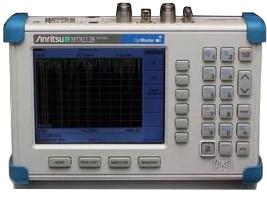
Cell Master MT8212B by Anritsu
For All of Your Testing Needs across Base Stations!
Cell Master MT8212B is a Battery-operated instrument with an optimal combination of nearly all the tools required for managing and troubleshooting base stations including;
• Interference analyzer
• Cable and antenna analyzer
• Channel scanner
• Spectrum analyzer
• Demodulator AM/FM
• GPS receiver
• Power meter
• Transmitter analyzer (GSM, CDMA and 1xEV-DO)
• Transmission analyzer for 2-port devices (built-in RF source)
• T1/E1 analyzer
In each aspect, MT8212B is a powerful gadget with tremendous portability and power. The Cell Master MT8212B is a lightweight instrument and weighs around 2.28 kg only (with batteries).
Frequency Ranges
• 25 MHz to 4.0 GHz Cable and Antenna Analyzer
• 100 kHz to 3.0 GHz Spectrum Analyzer (tunable to 9 kHz)
• 4.5 MHz to 3.0 GHz Power Meter
Identification of Signals Made Easy
The Cell Master MT8212B can assist in identifying between different signal types from PCS & Cellular sites. If you are troubled by an unknown signal than you can find its air interface standard and measured bandwidth as well comfortably with the help of MT8212B. For signals other than cellular/PCS ones it gives the bandwidth simply.
Outstanding Precision with FDR Technique
FDR (frequency domain reflectometry) is a known superior technique used to test transmission lines. The same FDR technique is employed in Cell Master MT8212B making it a better instrument. It helps in saving time consuming and costly troubleshooting efforts by testing antenna systems and cable feedlines at their proper operating frequency.
Practical Solution for Field Technicians & Engineers
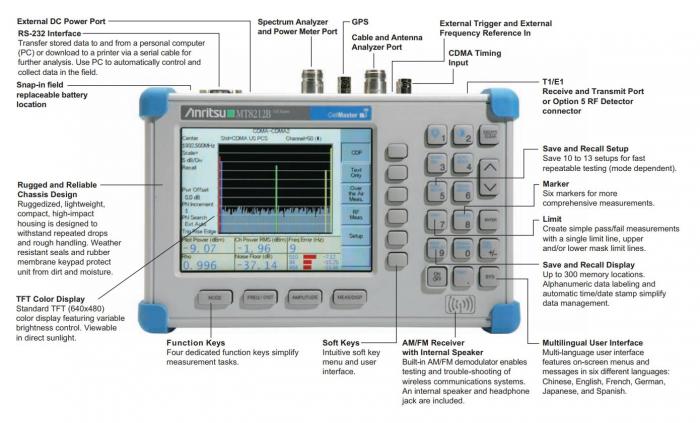
The best thing about MT8212B is its portability. It is a single instrument with multi-functionality and designed to perform well regardless of the operating environment. Cell Master MT8212B comes with adequate sealing against dirt and moisture whereas its reliable rugged design prevents damages to the instrument even in case of accidental falls.
Enhanced Color Display
Cell Master MT8212B is offered with a Color TFT Display. As this instrument is designed mainly for field applications thus the display is made viewable in direct sunlight and at wide viewing angles.
General Features
• User interface supports Multiple languages including Spanish & Japanese
• Memory for up to 300 traces & 25 setup configurations
• RS-232 9 pin D-sub for serial connections
• 10.8 volts, 1800 mA NiMH battery
• Weighs less than 5 lbs.
• Built-in AM/FM demodulator
• Compatible with several optional Cell Master Products for custom tailored configurations
• Worldwide frequency channels and signal standards built-in
Field replaceable battery
| Model | Anritsu MT8212B アンリツ MT8212B |
|---|---|
| Frequency Range | 25 MHz to 4.0 GHz |
| Cable & Antenna Analyzer | 25 MHz to 4.0 GHz |
| Spectrum Analyzer | 100 kHz to 3.0 GHz |
| Power Meter | 4.5MHz to 3.0 GHz |
| GPS Information | Latitude, Longitude, Altitude & UTC Time |
| Transmitter Analyzer | GSM, CDMA, cdmaOne, CDMA2000 1xRTT, and CDMA2000 1xEV-DO, and iDEN |
| Style | Handheld |
| Battery | Rechargeable, in-field replaceable |
| Manufacturer / Series | Anritsu / Cell Master |
| MODEL | FREQUENCY | MODE | MEASUREMENTS |
|---|---|---|---|
| MT8212B | 25 MHz - 4000 MHz | Cable and Antenna Annalyzer | Return Loss SWR Cable Loss Distance to Fault |
| 100 kHz - 3000 MHz | Spectrum Analyzer | Field Strength Channel Power Occupied Bandwidth Adjacent Channel Power Ratio Carrier to Interference Ratio AM/FM demodulation | |
| 4.5 MHz - 3000 MHz | Power Meter | Measure transmitter power in dBm/watts | |
| OPTION | ORDERING | DESCRIPTION | FEATURES/BENEFITS |
| Option 10 | MT8200/10 | Variable Bias Tee | Eliminates the need for an external power supply when measuring or using an amplifyer |
| Option 19 (requires PSN50 Sensor) | MT8200/19 | High Accuracy Power Meter | High accuracy power measurments for CW and modulated signals |
| Option 21 | MT8200/21 | Transmission Measurement | Measure Gain/Loss of two port device like filter, duplexer, and tower mounted amplifierAntenna-to-Antenna isolationRepeater measurement |
| Option 25 (requires YAGI antenna) | MT8200/25 | Interference Analyzer | Locate and identify the interfererSpectrogram – Three dimensional display- frequency, time and power to identify intermittent problemsRSSI-signal variation over timeIdentify and locate interference |
| Option 27 | MT8200/27 | Channel Scanner (AMPS, iDEN, TDMA,GSM, CDMA) | Measures frequency, bandwidth, and power of the multiple channels |
| Option 28 (requires CW signal generator kit 61534) | MT8200/28 | CW signal generator | Generates CW signal which can be varied from 0-90 dB in 1 dB steps |
| Option 31 (requires an Anritsu approved GPS antenna) | MT8200/31 | GPS | Save traces with location (latitude, longitude, and altitude) information |
| OPTION | ORDERING | DESCRIPTION | FEATURES/BENEFITS |
| Option 33(requires Options 31 and 43) | MT8200/33 | cdmaone andcdma2000 1xRTT Over The Air Measurement | Three strongest pilotsThree strongest multipaths delay in distance Carrier feed throughCode domain powerPilot powerRhoTauNoise floor |
| Option 34 | MT8200/34 | 1xEV-DO Over the Air | Three strongest pilots with powerTwo mulitpaths relative to strongest pilot |
| Option 40 | MT8200/40 | GSM RF Measurements | Channel powerOccupied bandwidth Burst power Carrier frequencyFrequency errorTiming sequence code |
| Option 42 | MT8200/42 | CDMA RF Measurements | Channel powerOccupied bandwidthCarrier frequencyFrequency errorNoise floor |
| Option 43 | MT8200/43 | cdmaone andcdma2000 1xRTTDemodulator | Code domain powerPilot powerRhoTauCarrier feed throughNoise floor |
| Option 50 | MT8200/50 | T1/E1 Analyzer | BER testingVpp as dBdsx or voltageMonitor voice channels (DS0/VF channel access) |
| Option 62 | MT8200/62 | CDMA2000 1xEV-DO | Spectrum displayIdle/Active displayPilot & Mac powerPilot powerIdle/Active activity %Idle/Active Data Occupied Bandwidth Frequency error |
| Option 63 | MT8200/63 | 1xEV-DO Demodulator | Mac code powerData code powerPilot & Mac powerRho Overall 1Rho Overall 2Rho PilotRho PilotPilot PowerData ModulationNoise Floor |
Frequently Asked Questions
Cell Master - Cable, Antenna and Base Station Analyzer
Model Number: MT8212B
Question: | |||||||||||||||||||||||||||||||||||||||
Which software do I use to update the firmware for Cell Master (MT8212B) products? | |||||||||||||||||||||||||||||||||||||||
Answer: | |||||||||||||||||||||||||||||||||||||||
Master Software Tools can be used to update the firmware for S331D, S332D, S311D, S312D, S325D, S810D, S820D, MS2711D and MT8212B. Establish a connection to the unit using a serial cable and make sure your Laptop is connected to the internet. Now, in the Tools Menu click on Product Updates . A new window opens which shows the latest firmware available on the Anritsu Website automatically for your product. To see a list of changes associated with this new firmware, click on the Revision Details button. Retieve the firmware file using the Retrieve File button and then when finished, click on Install to Unit button.
|
MT8212B
Main Image
Secondary Image
Cell Master - Cable, Antenna and Base Station Analyzer
In Stock
Ships 3-5 Days
919 809 5227

Rated 0/5 based on 0 ratings.
- MT8212B Technical Specifications
| Part Number: | MT8212B |
|---|---|
| Manufacturer: | Anritsu Corporation (Anritsu Kabushiki-gaisha) |
| Type: | Cell Master Cable Antenna Base Station Analyzer |