


Request a quote and receive a price in about 15 minutes.


Quick Quotes
Fast Shipping
1 Year Warranty
TDS3012B Technical Specifications:
| Manufacturer | Tektronix |
|---|---|
| Model Number | TDS3012B |
| Product Type | Digital Phosphor Oscilloscope |
TDS3012B
Home TDS3012B
| Part Number | TDS3012B |
| Manufacturer/Brand | Tektronix Inc |
| Description | Digital Phosphor Oscilloscope with VGA color LCD |

In Stock | Ships Today
Speak to a sales representative for pricing & lead time:
 Phone:
1-919-809-5227

• Quick Quotes: Receive Price & Availability Today!
• Warranty: 1 Year Warranty Covered by Apex Waves
• Calibration: Ask About Our Tiered Calibration Levels
• Option & Modules: Confirm Your Requirements or Versions
• Repair: Cost & Lead Time Available Upon Request for Service
- Description
- Technical Specifications
- Options & Accessories
- Product FAQ
- Troubleshooting Tips
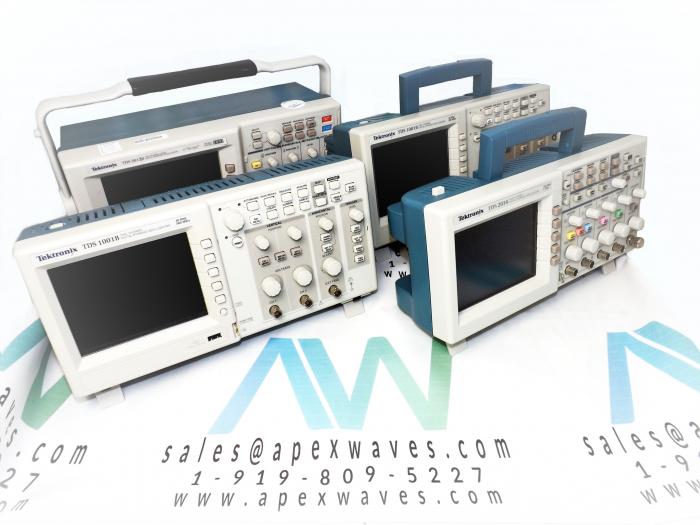
Tektronix TDS3012B Digital Phosphor Oscilloscope
The Tektronix model TDS3012B is one of the best expansions of the TDS3000 DPO Series, specially designed to bring more power and greater movability while as yet staying at a reasonable price. The DPO just showed signs of improvement: the TDS3012BB is more powerful and includes new equipment and programming highlights like WaveAlert, waveform abnormality identification, e*Scope, online remote control, Advanced Analysis Module (TDS3AAM), External Trigger added to 4-channel models, XY cursors, Limit Test Module (TDS3LIM), speedier CPU, quicker DPO, more precise time base, progressively and enhanced estimations, and a new Save All component.
This model is more portable and includes new optional accessories like a plugin thermal printer (TDS3PRT) and amazing features such as Full VGA Color LCD, Multi-dialect User Interface, FFT, and Advanced Pulse/Logic Triggering Modules, Two Video Modules for Testing and Troubleshooting, Farthest point Testing for Rapid Go/No-Go Testing, Broadcast communications Mask Testing, 9-Bit Vertical Resolution and 25 Automatic Measurements. The TDS3012B its still affordable with more standard highlights, built-in Ethernet port, more estimations, TDS3TRG, and TDS3FFT included with all models. But that is not all; this model has a bandwidth of 100 Hz, 24424 channels, 1.25 GS/s Sample Rate on each channel, 20 MHz of BW limit, and 4 ns to 10 s/div of Time Base Range.
If you are going to operate this instrument with battery power, you should check that this product is grounded. In order to prevent electric shock, connect a grounding wire between the ground terminal on the rear panel and earth ground.
If you are interested in this model and you want to learn more about its specifications and how to operate it, you can read its manual, which is available on the ApexWaves.com website.
| TDS3012B | Technical Specifications & Electrical Characteristics |
|---|---|
| Bandwidth | 100 MHz |
| Channels | 2 |
| Sample rate on each channel | 1.25 GS/s |
| Maximum record length | 10 K points on all TDS3000B Series models |
| Vertical resolution | 9 Bits on all TDS3000B Series models |
| Vertical sensitivity | 1 mV – 10 V on all TDS3000B Series models |
| Vertical accuracy | ±2% on all TDS3000B Series models |
| Max input voltage (1 MΩ) | 150 VRMS CAT I on all TDS3000B Series models (300 V CAT II with standard 10X probe) |
| Position range | ± 5 div on all TDS3000B Series models |
| BW limit | 20 MHz |
| Input coupling | AC, DC, GND on all TDS3000B Series models |
| Input impedance selections | 1 MΩ in parallel with 13 pF or 50 Ω on all TDS3000B Series models |
| Time base Range | 4 ns – 10 s/div |
| Time base Accuracy | 20 ppm on all TDS3000B Series models |
| Display (VGA) | Color active matrix LCD on all models |
| Physical Dimensions | Width: 14.8 inches Height: 6.9 inches Depth: 5.9 inches |
TDS3012B Tektronix Digital Phosphor Oscilloscope
Application Modules & Options:
- TDS3012B TDS3FFT FFT application package - The FFT application package adds FFT analysis and measurement capability to your TDS3012B oscilloscope. Application packages can be installed by the user.
- TDS3012B TDS3TRG Advanced Triggering application package - The advanced triggering application package adds pulse-width, slew-rate, pattern, state, runt, and edge-delay triggering capability to your TDS3012B oscilloscope. Application packages can be installed by the user.
- TDS3012B TDS3GM GPIB/RS-232 communication module - This communication module adds GPIB and RS-232 ports to your TDS3012B oscilloscope. You can attach a printer to these ports or use them for remote programmability. Communication modules can be installed by the user and include the TDS3000-Series oscilloscope Programmer Manual
- TDS3012B TDS3AAM Advanced Analysis Module - Adds extended math capability, arbitrary math expressions, measurement statistics and additional automated measurements.
- TDS3012B TDS3LIM Limit Testing Module - Offers fast, accurate Go/No Go verification that tested circuits are operating within intended parameters.
- TDS3012B TDS3TMT Telecommunications Mask Testing Module - Pass/Fail compliance of ITU-T G.703 and ANSI T1.102 standards, custom mask testing and more.
- TDS3012B TDS3VID Extended Video Editing Module - Adds Video QuickMenu, autoset, holdoff, line count trigger, video picture mode, vectorscope mode*1, HDTV format triggering graticules and more.
- TDS3012B TDS3SDI 601 Serial/Digital Video Module - Identify and analyze ITU-R BT.601 video signals, video picture mode with bright line select, vectorscope mode*1, HDTV format triggering and more.
- TDS3012B TDS3VM VGA/RS-232 communication module - This communication module adds VGA and RS-232 ports to your TDS3012B oscilloscope. You can attach a printer to the RS-232 port or use it for remote programmability. You can attach a monitor to the VGA port to enhance viewing the screen from a distance. Communication modules can be installed by the user and include the TDS3000-Series oscilloscope Programmer Manual.
- TDS3012B TDS3EM Ethernet communication module - This communication module adds Ethernet 10baseT and RS-232 ports to your TDS3012B oscilloscope. You can attach the oscilloscope to an Ethernet network for remote printing. Communication modules can be installed by the user and include the TDS3000-Series Programmer Manual.
- TDS3012B TDS3CHG external battery charger - The battery charger recharges the oscilloscope battery pack in approximately 3 hours.
- TDS3012BTDS3BAT rechargeable battery pack - An extra rechargeable battery pack provides a high-capacity spare battery for extended portable operation.
Q: Where can I find the TDS3012B oscilloscope manual?
A: You can find the TDS3012B oscilloscope manual on the Apex Waves TDS3012B product page or by visiting Tektronix website:
Q: What is the TDS3012B price TDS3012B ä¾¡æ ¼ ?
A: Apex Waves offers different prices per condition: New, New Surplus and Reconditioned units. Some factors affect pricing such as availability, current, obsolete and mature as well as condition. Please email a request for price and availability and we will get you a quotation including price & availability within 24 hours, guaranteed. Regardless of price, all units are guaranteed to work on arrival, backed by our one year warranty which is included in the Tektronix TDS3012B price and quotation. We stock the TDS3012B second hand ä¸å¤ with international shipping available.
Q: Is there such thing as a USB port upgrade option for the TDS3012B TDS3000 oscilloscope or the TDS3000B series oscilloscope?
A: Currently, there is no upgrade option for the TDS 3012B TDS 3000B oscilloscope model that will substitute floppy drives with a USB port.
Q: What are the differences between the TDS3000 Series and the TDS3012B TDS3000B Series from Tektronix?
A: Tektronix added the following major features to the TDS3012B TDS3000B Series of oscilloscopes:
- e*Scope
- WaveAlert
- Ethernet port
- Save All Waveform function
- XY Cursors
- External Trigger
- USB flash drive
- Delay and Phase measurements
- Various modules (see Modules & Options tab for reference)
Q: When I turn my TDS3012B oscilloscope TDS3000/3000B on the unit is not recognizing my floppy disk drive, containing the TDS3012B firmware update files. How can I resolve this?
A: When the TDS3012B firmware update disks are created, be sure the firmware files are located at the top level of the directory and not in a subfolder. I.e. A:fwdisk1.dat not A:subfolderfwdisk1.dat
To update your firmware on your TDS3012B Tektronix oscilloscope, you need to ensure your firmware files are located on the top level of your directory. Additionally, avoid placing the firmware file in any subfolders.
Q: My TDS3012B TDS3000B Tektronix scope is set up to print to a network printer. The problem is every time I print I get a header page. Is it possible to turn off the header page on my TDS3012B ?
A: To turn the header page off consult your printer operation user manual. (TDS3012B)
Q: Where can I find an IVI driver for TDS3012B TDS200+ TDS1000/TDS2000+ TDS1000B/TDS2000B+ TDS2000C+ TPS2000+ TDS3000/TDS3000B/TDS3000C+ DPO2000/MSO2000+ DPO3000/MSO3000+ DPO4000/MSO4000 series?
A: IVI drivers to support LabView, LabWindows/CVI, and LabView SignalExpress can be found on the National Instruments Developer Zone, http://zone.ni.com/.
For MSO3000 series please use the drivers posted for the DPO3000 series.
For MSO4000 series please use the drivers posted for the DPO4000 series.
For MSO2000, MSO3000 and MSO4000 series drivers do not support digital channel waveform transfer.
Please reference the programmer manual for more information. (TDS3012B)
Q: Is it possible to connect my Tektronix oscilloscope TDS3012B Ethernet connection with NI-NISA ?
A: You can connect your TDS3012B Tektronix oscilloscope through Ethernet connection via NIVIA using the following steps:
- Open your NIMAX software program
- 'Create New' connection by right-clicking on the "Devices and Interfaces" folder.
- Select VISATCP/IP Resource, click Next
- Select VXI-11 Lan Instrument for the TDS3012B, click Next
- Select either Manual Entry IP address or Browse Local Subnet on the TDS3012B
Q: Does the ADA400A Differential Preamplifier work the TDS3012B TDS3000+TDS3000B+ and TDS3000C series of oscilloscopes?
A: Yes, the ADA400A will work with any TDS3012B oscilloscope that has the TekProbe interface. This includes the TDS3000 and TDS3000B TDS3012B families. The data sheet for the ADA400A was written before these products existed, so they were not mentioned. (TDS3012B)
Q: How do I view a .dj file saved to the floppy drive on my TDS3012B TDS3000 series oscilloscope?
A: The file extension .dj means the file saved was intended to be sent to a DeskJet printer, and a file extension of .lj is a LaserJet printer and an extension of .tj is a ThinkJet printer file. The waveform files should have been saved as one of the viewable file formats such as .png or .bmp, or the waveform should have been sent to a connected printer.
The only way to view the file contents now is to put the file on your PC and send the file to a connected compatible printer that recognizes DeskJet, ThinkJet or LaserJet formats. (TDS3012B)
Q: How do I connect to my TDS3012B TDS3000 Series Tektronix Oscilloscope via an Ethernet connection with NI-VISA?
A: Connecting via NIVISA has the same end effect to connecting to your instrument via TekVISA, but the method is different. Here is a step-by-step tutorial, using a TDS3012B TDS3000B connected through Ethernet, and NIVISA version 4.0.2. (TDS3012B)
Q: What does it cost to repair the TDS3012B?
A: TDS3012B repair pricing will be determined after evaluation. Our repair process is very simple. We will issue an RMA for repair so that you can send the unit (including the RMA) to our facility where we can provide an evaluation for repair. This process can take 2-4 weeks to complete but can be expedited. (TDS3012B)
Q: Is ApexWaves.com an Authorized Distributor?
A: Apex Waves is not an authorized distributor, however we do offer New, New Surplus & Reconditioned units with competitive pricing including warranty, sub-assemblies, and documentation.
How-to Troubleshoot the TDS3012B Tektronix TDS3000B Oscilloscope
General Troubleshooting Tips
- Verify that your factory defaults were in fact recalled before configuring your scope or taking any measurements.
- Double check the circuit configuration. An incorrect connection or missing wire could alter your results.
Function Check procedure for Tektronix Oscilloscope
- Connect your oscilloscope power cable
- Power on your oscilloscope. Confirm that self tests have passed.
- Connect your oscilloscope probe to channel 1. Connect the probe tip & reference lead to PROBE COMP connectors.
- Press the AUTOSET button. You should see a square wave in the display (approx. 5V at 1kHz).
Troubleshoot: RS-232 Communications Port
- Verify the correct cable and adapters are in use
- Verify that cables are connected to the correct ports
- Reset the RS-232 parameters to Defaults, then set the Baud Rate to match the computer or hard copy device.
- Enable the debug window to view the RS-232 status, data transmitted, data transceived, and errors.
Troubleshoot: No signals onscreen (after scaling & offsetting)
- Double check for loose wiring or connections from the probe alligator clips / grabber clips.
- Verify your black leads from the probes are grounded.
- If earth ground is present, verify black leads of the probes and earth ground are at the same potential.
Troubleshoot: Unexpected signal onscreen
- Double check the timescale, a small piece of a larger waveform might be displayed.
- Double check that probe clips are connected to the correct circuit node.
If your problem persists
- Recall factory defaults once more and try again
- Contact Tech Support for further assistance
TDS3012B
Main Image
Secondary Image
Digital Phosphor Oscilloscope with VGA color LCD
In Stock
Ships Today
919 809 5227

Rated 0/5 based on 0 ratings.
- TDS3012B Technical Specifications
| Manufacturer: | Tektronix |
|---|---|
| Model Number: | TDS3012B |
| Product Type: | Digital Phosphor Oscilloscope |