


Request a quote and receive a price in about 15 minutes.


Quick Quotes
Fast Shipping
1 Year Warranty
TDS3034B Technical Specifications:
| Manufacturer | Tektronix |
|---|---|
| Model Number | TDS3034B |
| Product Type | Digital Phosphor Oscilloscope |
TDS3034B
Home TDS3034B
| Part Number | TDS3034B |
| Manufacturer/Brand | Tektronix Inc |
| Description | Digital Phosphor Oscilloscope with 4 channels |
 In Stock | Ships 3-5 Days
Speak to a sales representative for pricing & lead time:
 Phone:
1-919-809-5227

• Quick Quotes: Receive Price & Availability Today!
• Warranty: 1 Year Warranty Covered by Apex Waves
• Calibration: Ask About Our Tiered Calibration Levels
• Option & Modules: Confirm Your Requirements or Versions
• Repair: Cost & Lead Time Available Upon Request for Service
- Description
- Technical Specifications
- Modules & Options
- Troubleshooting Tips
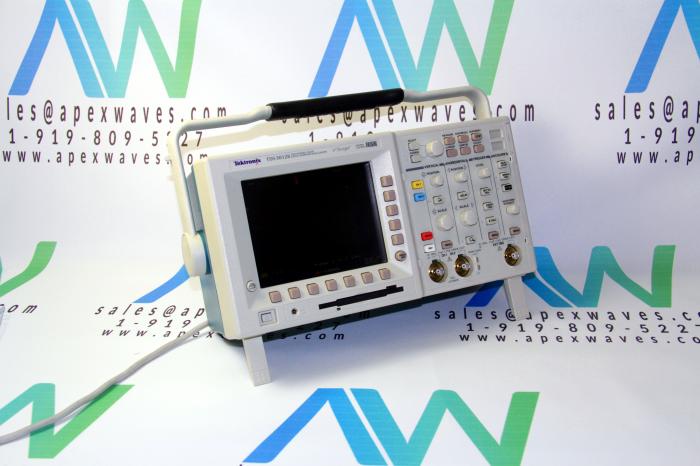
Tektronix TDS3034B Digital Phosphor Oscilloscope
The Tektronix TDS3034B Digital Phosphor Oscilloscope has a state activation framework, helpful for taking care of computerized issues and synchronous state logic machines, which triggers if a state signal is true or false right when a clock signal transition is valid. This model offers pulse trigger functions that activate the oscilloscope when a signal meets a time or limit condition.
This oscilloscope also includes a Press Width (or Glitch). The Pulse Width triggers the oscilloscope when a signal pulse width is less than, more prominent than, equivalent to, or not equivalent to a predetermined pulse width. The pulse width trigger is valuable for advanced logic troubleshooting. The TDS3034B has a Runt Pulse that triggers the oscilloscope when a signal pulse is less than a predetermined edge level. The user can likewise indicate runt pulse width parameters; this trigger is helpful for bus-contention issues.
This model has a Slew Rate that triggers the oscilloscope when a signal's slew rate (rise or fall time) is less than, more prominent than, equivalent to, or not equivalent to a slew rate. This trigger is valuable for investigating advanced bus transceivers, transmission lines, and operation amp circuits.
The TDS3034B Digital Phosphor Oscilloscope offers quick and straightforward verification that the circuit is working inside its proposed parameters. This is perfect for redundant testing applications where quick Go/No-Go choices are required. The user can make waveform reference formats to contrast with their live waveforms. The user can also likewise contrast any number of information channels and any blend of four references, and select activities for the TDS3034B oscilloscope to take if a waveform strays outside as far as possible: stop acquisition, sound a beep, print a copy, or save the waveform to disk.
| TDS3034B | Technical Specifications & Electrical Characteristics |
|---|---|
| Bandwidth | 300 MHz |
| Channels | 4 |
| Sample Rate on Each Channel | 2.5 GS/s |
| Maximum Record Length | 10 K points |
| Vertical Resolution | 9 Bits |
| Vertical Sensitivity (/div) | 1 mV to 10 V |
| Vertical Accuracy | ±2% |
| Max Input Voltage (1 M ohms) | 150 VRMS CAT I (300 V CAT II with standard 10X probe) |
| Position Range | ±5 div |
| BW Limit | 20, 150 MHz |
| Input Coupling | AC, DC, GND |
| Input Impedance Selections | 1 M ohms in parallel with 13 pF or 50 ohms |
| Time Base Range | 2 ns to 10 s/div |
| Time Base Accuracy | 20 ppm |
| Display Monitor (VGA) | Color active matrix LCD |
| Physical Dimensions | Inches |
| Width | 15 |
| Height | 7 |
| Depth | 6 |
| Weight | 7 lbs without battery |
| Weight | 11 lbs with battery |
| TDS3034B | Accessories |
|---|---|
TDS3TMT – | Telecom Mask Testing Application Module. |
TDS3AAM – | Advanced Analysis Module. |
TDS3LIM – | Limit Test Module. |
TDS3FFT – | Fast Fourier Transform Module. |
TDS3TRG – | Advanced Trigger Application Module. |
TDS3VID – | Extended Video Application Module. |
TDS3SDI – | 601 Serial Digital Video Module. |
TDS3GV – | GPIB, VGA and RS-232 interfaces. |
TDS3BAT – | Battery pack for up to 2 hours continuous operation without line power. Note: the instrument must be grounded at all times. |
TDS3PRT – | The TDS3PRT plug-in printer adds easy,portable documentation capability to your TDS3000B TDS3000 oscilloscope. Just plug it into the back of your oscilloscope and press Hardcopy to get a print of yourscreen. The printer works where your TDS3000B works– even when operating on battery power.Note:With TDS3000 series, printer does not operate onbattery power.016-1907-00 –5-roll pack of paper for TDS3PRT plug-in thermal printer. |
TDS3CHG – | Fast charger for battery pack. |
AC3000 – | Soft case for carrying instrument. |
HCTDS32 – | Hard plastic case for carrying instrument. |
RM3000 – | Rackmount kit. |
Service Manual (TDS3000B Series) – | English Only (071-0382-00). |
TDS3GV Programmers Manual – | English Only (071-0381-01). |
How-to Troubleshoot the TDS3034B Tektronix TDS3000B Oscilloscope
General Troubleshooting Tips
- Verify that your factory defaults were in fact recalled before configuring your scope or taking any measurements.
- Double check the circuit configuration. An incorrect connection or missing wire could alter your results.
Function Check procedure for Tektronix Oscilloscope
- Connect your oscilloscope power cable
- Power on your oscilloscope. Confirm that self tests have passed.
- Connect your oscilloscope probe to channel 1. Connect the probe tip & reference lead to PROBE COMP connectors.
- Press the AUTOSET button. You should see a square wave in the display (approx. 5V at 1kHz).
Troubleshoot: RS-232 Communications Port
- Verify the correct cable and adapters are in use
- Verify that cables are connected to the correct ports
- Reset the RS-232 parameters to Defaults, then set the Baud Rate to match the computer or hard copy device.
- Enable the debug window to view the RS-232 status, data transmitted, data transceived, and errors.
Troubleshoot: No signals onscreen (after scaling & offsetting)
- Double check for loose wiring or connections from the probe alligator clips / grabber clips.
- Verify your black leads from the probes are grounded.
- If earth ground is present, verify black leads of the probes and earth ground are at the same potential.
Troubleshoot: Unexpected signal onscreen
- Double check the timescale, a small piece of a larger waveform might be displayed.
- Double check that probe clips are connected to the correct circuit node.
If your problem persists
- Recall factory defaults once more and try again
- Contact Tech Support for further assistance
TDS3034B
Main Image
Secondary Image
Digital Phosphor Oscilloscope with 4 channels
In Stock
Ships 3-5 Days
919 809 5227

Rated 0/5 based on 0 ratings.
- TDS3034B Technical Specifications
| Manufacturer: | Tektronix |
|---|---|
| Model Number: | TDS3034B |
| Product Type: | Digital Phosphor Oscilloscope |